To plan a Tiny Desk AI video with friends, choose 1–5 individual portraits and assign each to its band role. Leave a slot empty to keep the original person. You do not need to fill the lead singer slot or replace the whole band.
Watch the demonstration, assign portraits to your selected roles, and review the quote before confirming a generation. The combinations below are casting plans, not completed results.
Start with the five Tiny Desk AI band roles
The role map is more useful than the order in which someone sends you a photo. A performer may appear in a wide shot, disappear during a close-up and return later. Your assignment should follow that role throughout the clip.
| Slot | Role | Where to look in the source |
|---|---|---|
| 1 | Lead singer | Navy visor and navy zip-up jacket with a star emblem; opens in side profile and returns in the long central close-up. |
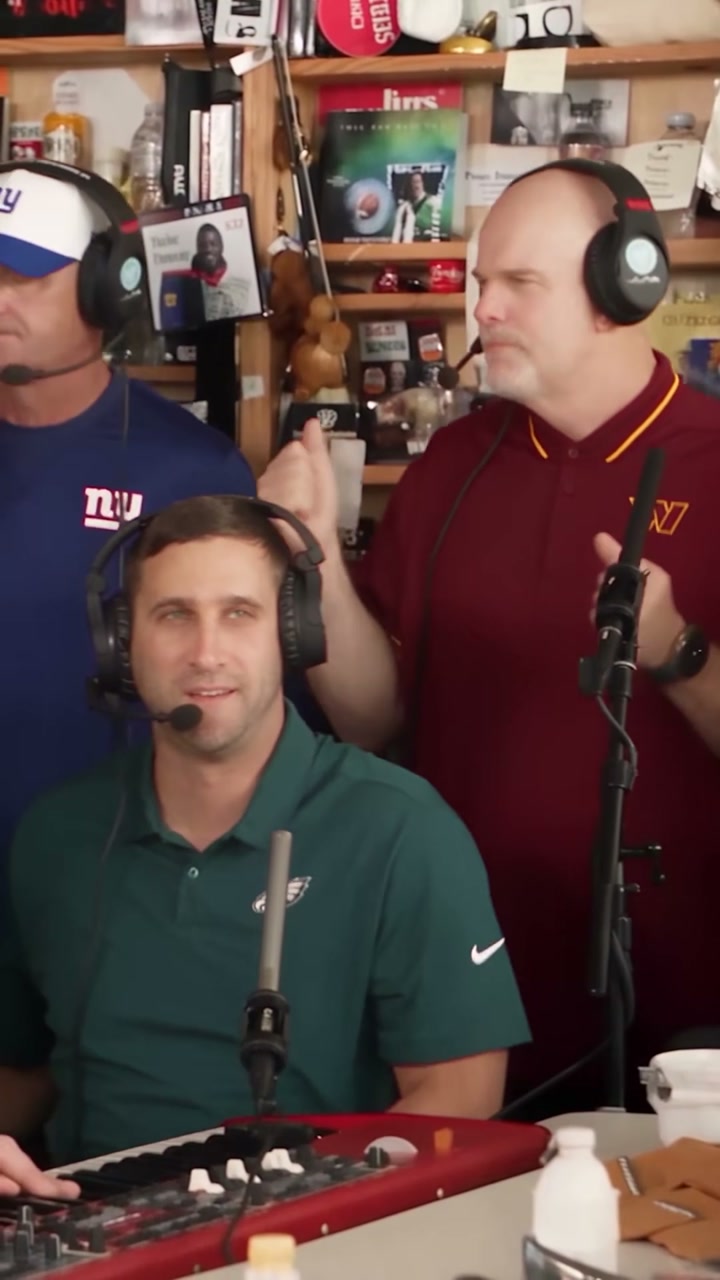
| 2 | Keyboard player | Green polo and black headset, seated at the red keyboard in the foreground of the band shots. |
| 3 | Left backing singer | Blue shirt, white-and-blue cap and black headset; at the back on the viewer's left in the three-person band shots. |
| 4 | Right backing singer | Maroon polo with yellow trim and black headset; at the back on the viewer's right in the three-person band shots. |
| 5 | Saxophonist | Gray-haired performer in a dark suit jacket, pale blue shirt and black headphones, playing the gold saxophone near the later solo cut. |
Use clothing and instruments to find the original performer. Your reference photo supplies the replacement person, including their appearance and outfit. The numbers stay fixed even when earlier slots are empty. A photo in slot 5 belongs to the saxophonist; it does not become the lead singer because it is the only image selected.
Choose a solo, duo or full-band casting plan
Decide which moments matter to your group before collecting every possible photo. For a birthday edit, the birthday person might take the lead. For a two-friend version, one person could sing while the other gets the saxophone moment. A group of five can assign one person to each role.
- One person: fill slot 1 for a lead-singer version, or slot 5 for a saxophone-only version. Leave the other four empty.
- Two friends: use slots 1 and 5 for vocals and sax. The keyboard player and both backing singers stay as they are in the source.
- Three people: slots 1, 2 and 5 give you vocals, keys and sax. The two backing roles can remain empty.
- A whole band: fill all five slots with separate portraits, following the labels.
These are examples, not required combinations. If the friend you want to feature fits a backing-vocal role, assign that slot instead. Keep a simple note of each person’s role so you can check it later.
Prepare one clear photo for each selected role
You do not need everyone in one group shot. Separate photos make the intended assignment clearer and let each friend choose a picture they are comfortable using. Use one visible face per reference, with enough detail to recognize the person.
A sharp, well-lit portrait is a better starting point than a tiny profile-picture screenshot. Avoid sunglasses and heavy filters that hide the features you want preserved. For file formats, size limits and photo selection, follow the main photo preparation walkthrough.
Leave the rest of the band unchanged
An empty slot means “keep the original person.” It does not mean “reuse the first photo,” “pick someone at random” or “move the next uploaded image into this position.” Removing a selected photo returns that role to the empty state.
For example, if you only want to change the saxophonist, put your chosen portrait in slot 5. Keep slots 1–4 empty. In a manual editing brief, name both the replacement and the four roles that should be preserved; see the Tiny Desk AI prompt guide for an example.
Check the cast across camera cuts
When you have a result to review, compare it with your role note and the source. Check each close-up and the band shots. Look for faces blending together, one friend appearing in several roles, or an unselected performer changing unexpectedly.
Also watch the hands, instruments and movement. A recognizable face in one frame does not guarantee consistent identity through the whole performance. Listen to the soundtrack and check its timing separately; a portrait is a visual reference and does not clone a friend’s voice.
Questions about making a Tiny Desk AI video with friends
Do I need five friends or five photos?
No. The planned layout accepts 1–5 photos. Fill only the roles you want to replace. Five separate portraits are needed only when you want a different person in every band role.
Can I leave the lead singer empty?
Yes. A backing singer, keyboard or saxophone assignment does not require a lead-singer photo. The lead stays as it appears in the source when slot 1 is empty.
Are my friends’ photos uploaded when I try the layout?
Selected photos are saved in this browser for up to 24 hours so you can return from checkout. Photos are submitted for processing only when you confirm generation. Clear a role to remove that assignment.
Start your Tiny Desk AI video with friends by watching the source and assigning the people you want to recast. The short version of the whole workflow is in the main tutorial.